
What Is Idle Time in Construction Equipment — And How Much Fuel Does It Waste?
TL;DR
Record shift hours but not idle hours, and you are already paying for idle diesel you cannot see on any document.
Idle time is engine-on time with no productive load. True idle — breaks, waiting, standby — is the waste. Working idle — hydraulics, system pressure — is not.
You cannot reduce what you do not measure. Tracking the idle split per asset, per shift is the first real step, and the rest follows from it.
A machine is parked on a construction site. The engine is on. No operator is inside. It has been like this for 45 minutes.
Diesel is burning. Nothing is being built.
This scene plays out on large construction sites every day. The problem is not a single machine left running. The problem is that most sites do not measure how many assets are idling, for how long, or what that idle time is costing them in fuel.
Most sites track shift hours. Very few track idle hours separately. So fuel burned at idle gets absorbed into normal operating cost and goes unnoticed — the bill is visible, the reason behind it is not.
This blog is not about switching engines off. It is about making idle fuel a number you can see on every asset — and then act on.
What idle time means
Idle time is the period when a machine’s engine is running, but the machine is not performing productive work.
On construction and EPC sites, this happens for many reasons. A machine may be waiting for material, waiting for another activity to finish, or standing by between tasks. In some cases the operator is on a break but leaves the engine running. In others, the machine is kept on to avoid the perceived delay of restarting it.
One point is often overlooked: idle fuel consumption is not zero. Even with no load, a diesel engine keeps burning fuel every minute it stays on. The rate is lower than under active operation, but it is never nothing.
It also matters which kind of idle you are looking at. An engine running to power hydraulics, hold system pressure, or support on-site equipment may still serve an operational purpose even while stationary. An engine left running during breaks, waiting periods, or between tasks is burning diesel for no output.
Quick reference — the two kinds of idle, and which one is actually waste:
| Type | What the engine is doing | Is it waste? |
|---|---|---|
| Working idle | Powering hydraulics, holding system pressure, running a genset or attachment | No — still serving an operational purpose |
| True idle | Running during breaks, waiting for material, standing by between tasks | Yes — diesel burned with no output |

Separating these two conditions shows where fuel is genuinely being used and where avoidable waste is occurring.
How much fuel does idling waste
Every diesel engine has two consumption rates. Working consumption is the engine under load, doing actual work. Idle consumption is the engine on, with no load. The difference between the two is the idle fuel waste.
Exact figures vary by asset class. Check the fuel consumption section of your asset’s Operation & Maintenance manual — working LPH and idle LPH are listed separately in the engine performance data.
In one example from an Aether-monitored fleet, a vehicle was tracked over a 7-day period — 168 hours total. Engine operation came to 15 hours 51 minutes, just 9% of the deployment window. The remaining 91% covers engine-off and idle time combined; without a separate idle-hours filter, a logsheet cannot tell you how much of that was the engine idling versus genuinely switched off. That split only appears once idle hours are tracked on their own.
A worked example below — illustrative figures only. Plug in your own idle LPH from the O&M manual and your current diesel rate.
Idle fuel cost — worked example
Idle (no-load) consumption3 L / hr
Average true idle per shift2 hrs
Diesel rate₹90 / L
Per asset, per day (3 × 2 × 90)₹540
Fleet of 20 assets × 26 working days
₹2,80,800 / month
₹540 a day per asset is easy to ignore. ₹2.8 lakh a month across the fleet is not — and on most mid-size fleets the real total comes in higher than anyone expects the first time it is calculated. The point is the method, not the figure.
Why idle fuel waste stays hidden
Manual logsheets record total shift hours. The operator writes a start time and an end time. That is all.
Those records do not separate idle time from working time. A machine that ran productively for five hours and idled for three shows up as one eight-hour entry. Fuel is then issued against shift hours, so on paper all of it looks justified — the bill matches the hours, and the hours match the logsheet.
A supervisor may know an asset was idling. But there is no record to show it and no number to put in front of management, so the cost gets absorbed into “normal consumption” every month — paid for, signed off, and forgotten. Not because it is small, but because there is nothing to compare the fuel bill against.
And fuel is not the only cost hiding here. An engine running at idle still clocks engine hours, so service intervals fall due sooner — you pay to service a machine for hours that produced nothing. Resale value is read off engine hours too. Idle inflates both the maintenance bill and the depreciation, and neither shows up in the kilometre log or the shift record.
How to measure idle time
Measuring idle time needs two data points. The first is ignition-on hours — the time the key is on. The second is actual engine operation — the time the engine is truly running, captured through the RPM line or alternator connection.
Idle time is the gap between them:
Idle time = ignition-on hours − actual engine operation hours
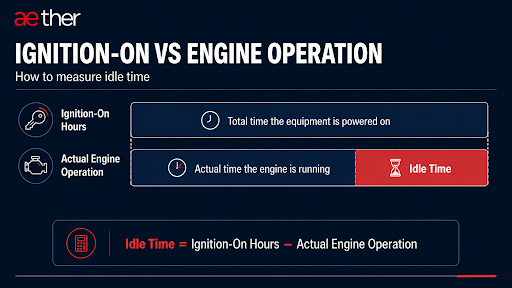
This split is available per asset, per shift, with no manual input. The IoT device on each machine captures it and sends it to the platform, so the P&M team can see which assets idled and for how long — without depending on what the operator wrote down.
One point matters for accuracy. An ignition-only connection shows when the key was on, not whether the engine was running under load. An RPM or alternator connection shows real engine operation, and gives the better data for idle tracking.
To go deeper on how this data is captured and verified, see the Fuel Monitoring System Guide.
Want to see idle time data on your fleet?
See ignition-on vs actual engine operation for every asset, per shift — the idle split, without depending on manual logsheets.
How to reduce idle hours
Idle data is only useful if it leads to action — and you cannot get there by telling operators to “switch off.” On a live site some engines must stay on, and a blanket idle rule is ignored within a week. Reduction follows from measurement, not from policy, and it targets true idle only — working idle is doing a job. The four steps below turn the split into decisions. Watch for one thing throughout: repeat patterns. A single long idle event matters less than the same asset idling at the same point in the shift, three days running. That is a scheduling gap or an operator habit with a fixed cause — and those are the only idle events worth a meeting.
| Step | What to do | What to check | What it tells you |
|---|---|---|---|
| 1 — Check the split daily | Review active vs idle hours per asset category | Any category where idle hours exceed 25% of shift hours | Which asset types are idling most |
| 2 — Find repeat assets | Look for the same assets showing high idle across shifts | Same asset, same pattern, 3 or more shifts in a row | Operator habit or scheduling gap — investigate separately |
| 3 — Match fuel to working hours | Compare fuel issued against actual working hours, not shift hours | Was 8 hours of fuel issued when the asset worked 5? | Fuel is being allocated on shift time, not working time |
| 4 — Set a limit per category | Define acceptable idle per shift per asset type (an excavator and a DG set differ) | Anything above the ceiling you set | Who to review in the next P&M meeting |
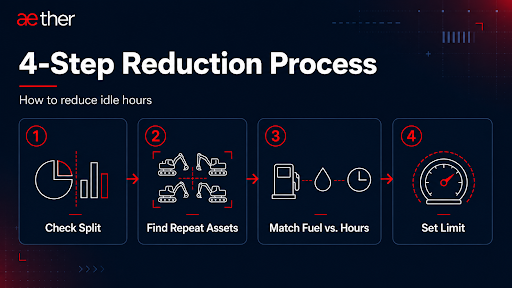
The change is never the policy — it is the visibility. Once idle is a tracked number per asset, reducing it is just acting on the outliers each week. It moves the conversation from “I think it idles a lot” to “here is the asset, the pattern, and the cost.” For how this fits into wider asset monitoring, see the Fleet Management System.
Start by measuring the split
If your site records shift hours but not idle hours separately, you are approving fuel costs you cannot verify. The first step is measuring the split. The rest follows from there.
See your idle split this week
Get ignition-on vs actual engine-operation hours per asset — and turn idle fuel into a number your P&M team can act on.
Frequently asked questions
How do you calculate how much fuel is wasted from idling on a construction site?
You only need two numbers from the O&M manual: working LPH and idle LPH. The difference is the idle waste rate per hour. Multiply by total idle hours across the fleet in a shift for the daily figure, then by working days for the month. The arithmetic is trivial — the hard part is the idle-hours input, which is why ignition-on vs actual engine operation data, not the logsheet, is the real starting point.
How is idle time different from engine hours?
Engine hours are the total time the engine ran. Idle time is the slice of those hours with no productive load. An asset can show eight engine hours while only five involved real work. This is also why two machines with identical engine hours are not worth the same: the one that idled less did more work for the same wear, and that gap shows up at resale. Idle time is found by comparing ignition-on hours against actual engine operation — an ignition-only connection alone cannot measure it.
How do you reduce idle time on a large construction fleet?
Start by measuring it, so the waste becomes a number rather than a guess. Then find the assets and time slots with the highest idle, separate operator habits from scheduling gaps, set an acceptable limit per asset category, and tie fuel allocation to working hours. Across a large fleet, small reductions repeated every shift add up to a measurable monthly saving — but the change starts with visibility. You cannot reduce what you have never recorded.
Related Reading